Web Dashboard
streamlit 의 다양한 UI 함수들 정리 2 - dataframe
yugyeong
2022. 12. 13. 11:18
|
1
2
3
4
5
6
7
8
9
10
11
12
13
14
15
16
17
|
# 판다스의 데이터프레임을, 웹화면으로 보여주는 방법
import streamlit as st
import pandas as pd
def main() :
st.title('아이리스 꽃 데이터')
df = pd.read_csv('streamlit_data/iris.csv')
st.dataframe(df)
species = df['species'].unique()
st.text('아이리스 꽃은 ' + species + ' 으로 되어있다')
if __name__ == '__main__' :
main()
|
cs |
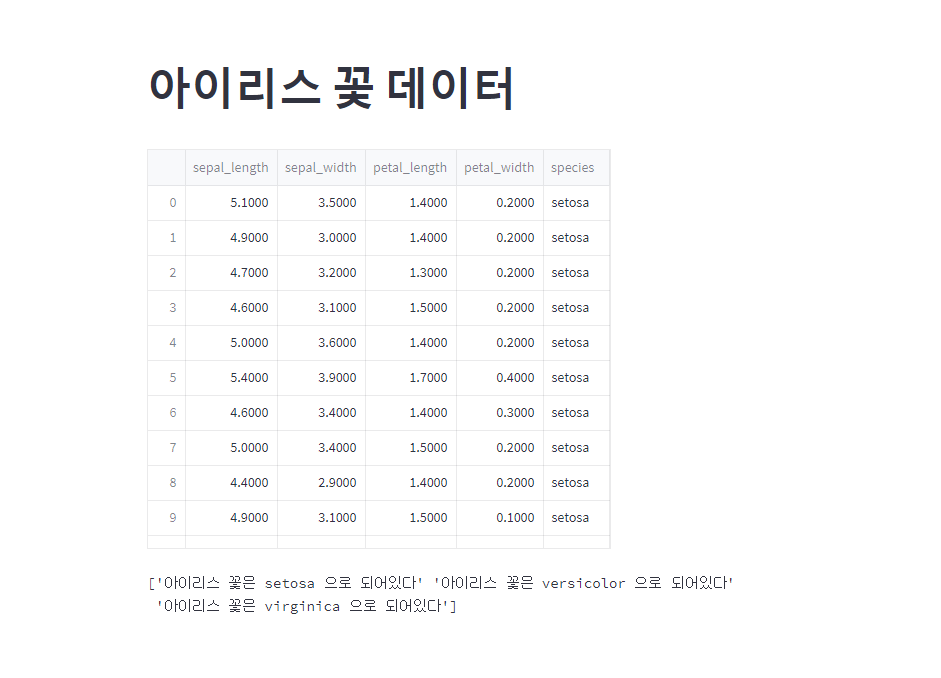
streamlit 에서 csv 파일을 데이터프레임 형식으로 웹 화면에 보여주는 방법이다.
st.dataframe 함수를 이용하여서 괄호 안에 데이터프레임을 넣어주면 된다.
특정 컬럼의 유니크한 값들을 웹페이지에 리턴하고자 할 때는, unique() 함수를 이용하여서 변수에 저장을 해준 후 st.text 함수를 이용하면 된다.