MySQL Connector 을 이용하여서 insert 하는 방법이다.
1. API 서버 구축
메인 파일 app.py
# app.py
from flask import Flask
from flask_restful import Api
from resources.recipe import RecipeListResource

app = Flask(__name__)

api = Api(app)

# 경로와 리소스(api코드) 연결
api.add_resource(RecipeListResource, '/recipes')

if __name__ == '__main__' :
    app.run()
2. 기능 설계
새로운 파이썬 파일을 만들어서, class 를 생성한다.
그 안에 post 함수를 아래와 같은 형식으로 작성을 해주면 된다.
쿼리문을 만들 때에는, MySQL에서 미리 테스트를 해보고 잘 작동한 코드를 가져와서 데이터가 들어가야하는 자리에 %s 를 넣어주면 된다.
class RecipeListResource(Resource) :

    # API 를 처리하는 함수 개발
    # HTTP Method 를 보고, 똑같이 만들어준다.

    def post(self) :

        # 1. 클라이언트가 보내준 데이터가 있으면,
        #    그 데이터를 받아준다.
        data = request.get_json()
        # print(data)

        # 2. 이 레시피 정보를 DB에 저장해야한다.
        try:
            ### 1. DB 에 연결
            connection = get_connection()

            ### 2. 쿼리문 만들기
            query = ''' insert into recipe
                    (name, description, num_of_servings, cook_time, directions)
                    values
                    ( %s,%s, %s, %s, %s); '''
            ### 3. 쿼리에 매칭되는 변수 처리 해준다. 튜플로!
            record = ( data['name'], data['description'], data['num_of_servings'], data['cook_time'], data['directions'] )

            ### 4. 커서를 가져온다.
            cursor = connection.cursor()

            ### 5. 쿼리문을, 커서로 실행한다.
            cursor.execute(query, record)

            ### 6. 커밋 해줘야, DB에 완전히 반영된다.
            connection.commit()

            ### 7. 자원 해제
            cursor.close()
            connection.close()

        except Error as e :

            print(e)
            cursor.close()
            connection.close()

            return {"result" : "Fail", "error" : str(e)}, 500

        # API 를 끝낼 때는,
        # 클라이언트에 보내줄 정보(json)와
        # http 상태 코드를 리턴한다(보내준다).
        return {"result" : "success"}, 200
3. postman 에서 API 기능 테스트
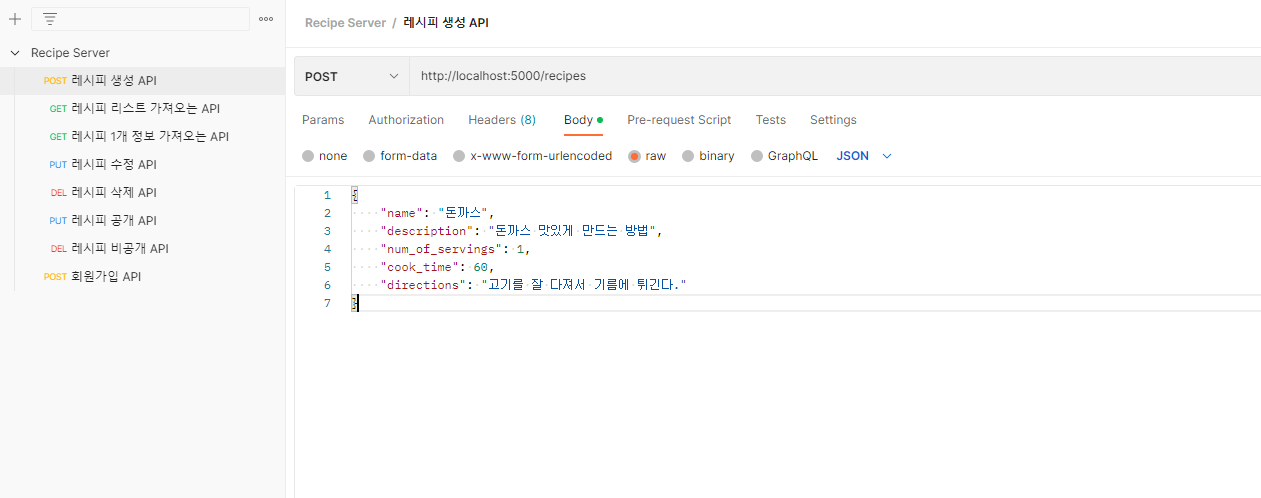
- Body - raw - JSON
- 코드 입력 후 Send
먼저, postman 에서 Add request 를 하여서, POST 를 선택한 후 URI 를 적어준다.
그 후 Body - raw - json 형식을 선택하여서, insert 할 데이터를 작성해준다.
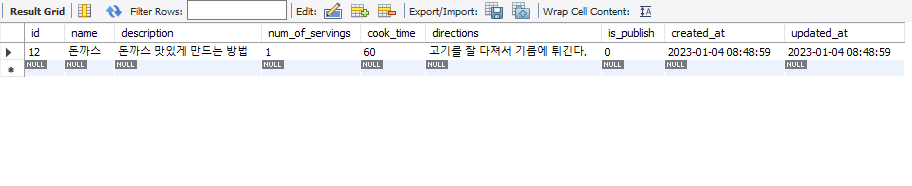
4. 잘 작동 되었는지 Mysql 로 돌아와서 확인
'Flask' 카테고리의 다른 글
| API서버 - MySQL Connector 를 이용해 update 하기 (PUT) (0) | 2023.01.04 |
|---|---|
| API서버 - MySQL Connector 를 이용해서 select 하기 (GET) (0) | 2023.01.04 |
| Python 에서 Mysql 연동하기 (0) | 2023.01.04 |
| [ Flask ] 가상환경 설정, 필요한 프레임워크와 라이브러리 설치 (0) | 2023.01.03 |
| Restful API (URL, Methods, Message) (0) | 2023.01.03 |