로그인한 회원과 비로그인 회원 구분하여 데이터를 나타내는 API 설계하기
API 설명 : 영화 추천 API
로그인 회원과 비로그인 회원을 구분
- 영화 리스트를 가져오는 API 에서 로그인한 회원이 영화 리스트를 가져오도록 하면 즐겨찾기한 영화를 같이 나타낸다. ( Authorization 을 선택했을 때 )
- 비로그인한 회원이 영화 리스트를 가져오도록 하면 영화 리스트들만 나타내도록 한다. ( Authorization 을 미선택 했을 때 )
로그인한 회원이 영화 리스트를 가져오도록 하면, 아래의 결과처럼 즐겨찾기한 데이터에는 "favorite : 1" 로 표현할 것이다.
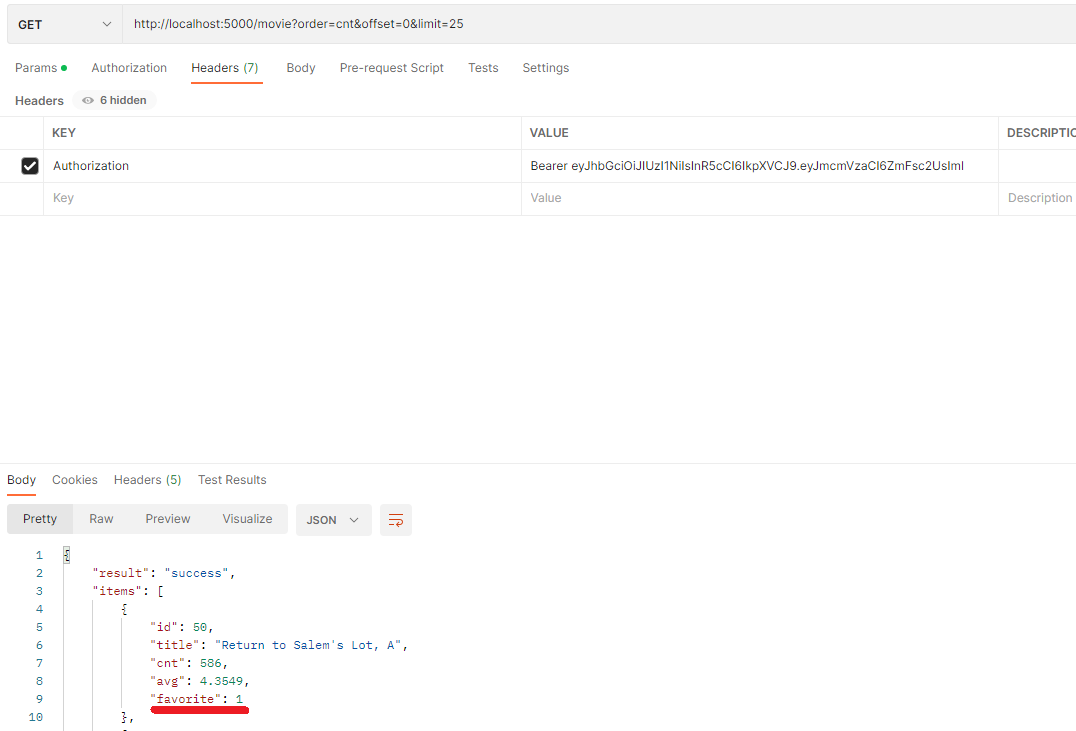
이럴때는 Visual Studio Code 에서 코드를 작성할 때,
@jwt_required 의 optioanl 파라미터를 True로 두고, if 문을 이용하여 코드를 작성하면 된다.
@jwt_required(optional= True)
    def get(self) :
        user_id = get_jwt_identity()

        order = request.args.get('order')
        offset = request.args.get('offset')
        limit = request.args.get('limit')


        try :
            connection = get_connection()

            # 비회원일때
            if user_id is None :
                query = '''select m.id ,m.title, count(r.movie_id) as cnt, ifnull(avg(rating), 0) as avg
                    from movie m
                    left join rating r
                    on m.id = r.movie_id
                    left join favorite f
                    on m.id = f.movie_id
                    group by m.id
                    order by ''' + order + '''  desc
                    limit ''' + offset + ''', '''+ limit + ''';'''

                cursor = connection.cursor(dictionary=True)
                cursor.execute(query)

            else :
                query = '''select m.id ,m.title, count(r.movie_id) as cnt, ifnull(avg(rating), 0) as avg ,
                            if ( f.user_id is not null , 1 , 0) as favorite
                        from movie m
                        left join rating r
                        on m.id = r.movie_id
                        left join favorite f
                        on f.movie_id = m.id and f.user_id = %s
                        group by m.id
                        order by ''' + order + '''  desc
                        limit ''' + offset + ''', '''+ limit + ''';'''

                record = (user_id, )
                cursor = connection.cursor(dictionary=True)
                cursor.execute(query, record)


            result_list = cursor.fetchall()

            i = 0
            for row in result_list :
                result_list[i]['avg'] = float(row['avg'])
                i = i + 1

            cursor.close()
            connection.close()


        except Error as e :
            print(e)
            cursor.close()
            connection.close()
            return {"error" : str(e)}, 500

        # print(result_list)

        return {"result" : "success" ,
                "items" : result_list ,
                "count" : len(result_list)}, 200
if 문 안에 로그인 회원, 비로그인 회원이 api 를 이용했을 때, 작동할 쿼리를 각각 작성하여서 동작시키면 된다.
'Flask' 카테고리의 다른 글
| S3 에 저장돼 있는 이미지를 객체 탐지 하는 API - Amazon Rekognition (0) | 2023.01.12 |
|---|---|
| Serverless framework 를 Github Actions 를 이용하여 자동배포하기 (0) | 2023.01.12 |
| Flask, Postman 에서 offset, limit 로 데이터 끊어서 가져오기 (1) | 2023.01.06 |
| 로그인한 유저만 처리할 수 있는 API 에 토큰 적용하는 방법 (0) | 2023.01.05 |
| Flask 에서 로그아웃 API 코드 작성하는 방법 (0) | 2023.01.05 |