Flask 프레임워크를 이용하여서 이미지 파일과 내용을 올리면 DB에 저장하는 API 를 개발하였다.
DB에는 이미지 url 을 저장할 것이기 때문에, img 파일을 S3 에 저장하고 저장된 파일의 url 을 가져오도록 하였다.
1. postman
- POST
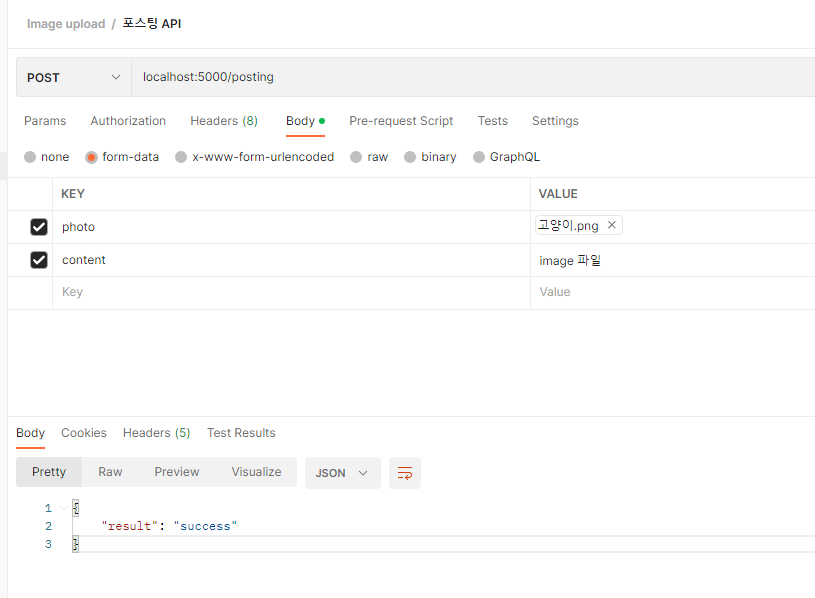
- Body - form-data - KEY 값 설정
먼저 포스트맨에서 설정을 먼저해주었다. 파일을 올리는 것이기 때문에 POST 이다.
key 값에 photo, content 를 넣었다.
2. 코드 작성
사용한 라이브러리
from flask import request
from flask_jwt_extended import jwt_required
from flask_restful import Resource
from mysql.connector import Error
from flask_jwt_extended import get_jwt_identity
from mysql_connection import get_connection

from datetime import datetime
import boto3
from config import Config
- 데이터를 받아와야하기 때문에 request 를 하여 변수에 저장한다.
- boto3 라이브러리를 이용한다.
- 디비에 저장하기 위해서 디비 연결을 한다.
class postingResource(Resource) :
    # 사진과 내용을 올리면 db에 저장
    def post(self) :
        # 1. 클라이언트로부터 데이터 받아온다.
        # form-data
        # photo : file
        # content : text

        # 사진과 내용은 필수 항목 !
        if 'photo' not in request.files or 'content' not in request.form :
            return {'error' : '데이터를 정확히 보내세요.'}, 400

        file = request.files['photo']
        content = request.form['content']

        # 사진만 업로드 가능하도록 하는 코드
        if 'image' not in file.content_type :
            return {'error' : 'image 파일만 업로드 가능합니다.'}, 400

        # 2. 사진을 먼저 S3에 저장한다.
        # 파일명을 유니크하게 만드는 방법
        current_time = datetime.now()
        new_file_name = current_time.isoformat().replace(':', '_') + '.jpg'

        # 파일명을, 유니크한 이름으로 변경한다.
        # 클라이언트에서 보낸 파일명을 대체!

        file.filename = new_file_name

        # S3 에 파일을 업로드 하면 된다.
        # S3 에 파일 업로드 하는 라이브러리가 필요
        # 따라서, boto3 라이브러리를 이용해서
        # 업로드 한다.

        client = boto3.client('s3',
                    aws_access_key_id = Config.ACCESS_KEY ,
                    aws_secret_access_key = Config.SECRET_ACCESS )

        try :
            client.upload_fileobj(file,
                                    Config.S3_BUCKET,
                                    new_file_name,
                                    ExtraArgs = {'ACL':'public-read', 'ContentType' : file.content_type } )

        except Exception as e:
            return {'error' : str(e)}, 500

        # 3. 저장된 사진의 imgUrl 을 만든다.
        imgUrl = Config.S3_LOCATION + new_file_name

        # 4. DB에 저장한다.
        try :
            connection = get_connection()

            query = '''insert into posting (content, imgUrl)
                        values
                        (%s, %s);'''

            record = (content, imgUrl)
            cursor = connection.cursor()
            cursor.execute(query, record)
            connection.commit()

            cursor.close()
            connection.close()

        except Error as e :
            print(e)
            cursor.close()
            connection.close()
            return {'error' : str(e)}, 500


        return {'result' : 'success'}, 200
3. MySQL 확인
데이터가 잘 들어갔는지 Mysql 을 확인한다.

'Flask' 카테고리의 다른 글
| 네이버의 Papago Open API 이용하기 (0) | 2023.01.13 |
|---|---|
| 네이버의 뉴스 검색 Open API 이용하기 (0) | 2023.01.13 |
| 종속성이 있는 라이브러리를 lambda layer 로 만드는 방법 (0) | 2023.01.12 |
| S3 에 저장돼 있는 이미지를 객체 탐지 하는 API - Amazon Rekognition (0) | 2023.01.12 |
| Serverless framework 를 Github Actions 를 이용하여 자동배포하기 (0) | 2023.01.12 |