네트워크 통신을 위한 라이브러리에는
- Volley
- Retrofit2
두가지가 있다.
여기서는 Volley 라이브러리에 대해서 설명할 것이다.
Volley 공식 홈페이지
https://google.github.io/volley/
Volley overview
Volley overview Volley is an HTTP library that makes networking for Android apps easier and most importantly, faster. Volley is available on GitHub. Volley offers the following benefits: Automatic scheduling of network requests. Multiple concurrent network
google.github.io
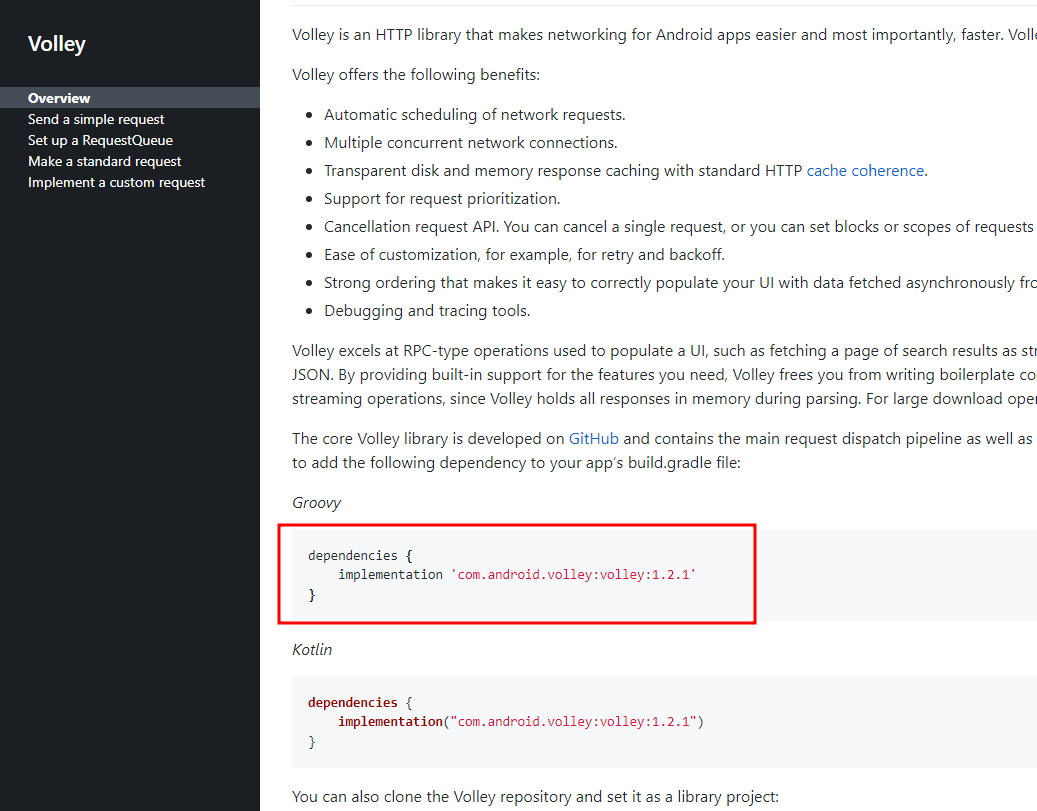
Volley 공식 홈페이지에 dependecies 코드가 있다.
내 안드로이드 프로젝트에
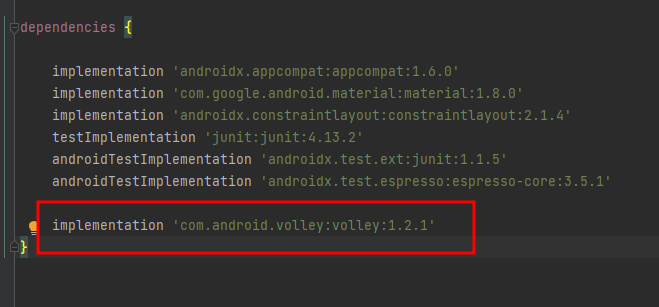
1. dependencies 코드를 추가한다.
코드를 추가하면 상단바에 sync now 가 뜬다.
Sync Now 를 클릭해준다.
Volley 라이브러리를 이용할 때는 아래처럼 코드를 작성하면 된다.
json 데이터는 https://jsonplaceholder.typicode.com/ 사이트를 이용하였다.
JSONPlaceholder - Free Fake REST API
{JSON} Placeholder Free fake API for testing and prototyping. Powered by JSON Server + LowDB. Tested with XV. As of Oct 2022, serving ~1.7 billion requests each month.
jsonplaceholder.typicode.com
public class MainActivity extends AppCompatActivity {

    TextView txtUserId;
    TextView txtId;
    TextView txtTitle;
    TextView txtBody;

    final String URL = "https://jsonplaceholder.typicode.com";


    @Override
    protected void onCreate(Bundle savedInstanceState) {
        super.onCreate(savedInstanceState);
        setContentView(R.layout.activity_main);

        txtUserId = findViewById(R.id.txtUserId);
        txtId = findViewById(R.id.txtId);
        txtTitle = findViewById(R.id.txtTitle);
        txtBody = findViewById(R.id.txtBody);

        // Volley 로 네트워크 통신한다.
        RequestQueue queue = Volley.newRequestQueue(MainActivity.this);

        JsonObjectRequest request = new JsonObjectRequest(
                Request.Method.GET,
                URL + "/posts/1",
                null,
                new Response.Listener<JSONObject>() {
                    @Override
                    public void onResponse(JSONObject response) {

                        Log.i("NETWORK_APP", response.toString());

                    }
                },
                new Response.ErrorListener() {
                    @Override
                    public void onErrorResponse(VolleyError error) {

                    }
                }

        );

        // 이 코드가 있어야, 네트워크 실행한다.
        queue.add(request);

    }
}
전체코드
activity_main.xml
<?xml version="1.0" encoding="utf-8"?>
<androidx.constraintlayout.widget.ConstraintLayout xmlns:android="http://schemas.android.com/apk/res/android"
    xmlns:app="http://schemas.android.com/apk/res-auto"
    xmlns:tools="http://schemas.android.com/tools"
    android:layout_width="match_parent"
    android:layout_height="match_parent"
    tools:context=".MainActivity">

    <LinearLayout
        android:layout_width="415dp"
        android:layout_height="636dp"
        android:orientation="vertical"
        app:layout_constraintBottom_toBottomOf="parent"
        app:layout_constraintEnd_toEndOf="parent"
        app:layout_constraintStart_toStartOf="parent"
        app:layout_constraintTop_toTopOf="parent">

        <TextView
            android:id="@+id/txtUserId"
            android:layout_width="match_parent"
            android:layout_height="wrap_content"
            android:layout_margin="10dp"
            android:text="TextView"
            android:textSize="28sp" />

        <TextView
            android:id="@+id/txtId"
            android:layout_width="match_parent"
            android:layout_height="wrap_content"
            android:layout_margin="10dp"
            android:text="TextView"
            android:textSize="28sp" />

        <TextView
            android:id="@+id/txtTitle"
            android:layout_width="match_parent"
            android:layout_height="wrap_content"
            android:layout_margin="10dp"
            android:text="TextView"
            android:textSize="28sp" />

        <TextView
            android:id="@+id/txtBody"
            android:layout_width="match_parent"
            android:layout_height="wrap_content"
            android:layout_margin="10dp"
            android:text="TextView"
            android:textSize="28sp" />
    </LinearLayout>
</androidx.constraintlayout.widget.ConstraintLayout>
MainActivity.java
package com.dbrud1032.networkapp1;

import androidx.appcompat.app.AppCompatActivity;

import android.app.DownloadManager;
import android.app.VoiceInteractor;
import android.os.Bundle;
import android.util.Log;
import android.widget.TextView;

import com.android.volley.Request;
import com.android.volley.RequestQueue;
import com.android.volley.Response;
import com.android.volley.VolleyError;
import com.android.volley.toolbox.JsonArrayRequest;
import com.android.volley.toolbox.JsonObjectRequest;
import com.android.volley.toolbox.JsonRequest;
import com.android.volley.toolbox.Volley;

import org.json.JSONObject;

public class MainActivity extends AppCompatActivity {

    TextView txtUserId;
    TextView txtId;
    TextView txtTitle;
    TextView txtBody;

    final String URL = "https://jsonplaceholder.typicode.com";


    @Override
    protected void onCreate(Bundle savedInstanceState) {
        super.onCreate(savedInstanceState);
        setContentView(R.layout.activity_main);

        txtUserId = findViewById(R.id.txtUserId);
        txtId = findViewById(R.id.txtId);
        txtTitle = findViewById(R.id.txtTitle);
        txtBody = findViewById(R.id.txtBody);

        // Volley 로 네트워크 통신한다.
        RequestQueue queue = Volley.newRequestQueue(MainActivity.this);

        JsonObjectRequest request = new JsonObjectRequest(
                Request.Method.GET,
                URL + "/posts/1",
                null,
                new Response.Listener<JSONObject>() {
                    @Override
                    public void onResponse(JSONObject response) {

                        Log.i("NETWORK_APP", response.toString());

                    }
                },
                new Response.ErrorListener() {
                    @Override
                    public void onErrorResponse(VolleyError error) {

                    }
                }

        );

        // 이 코드가 있어야, 네트워크 실행한다.
        queue.add(request);

    }
}'Android' 카테고리의 다른 글
| 네트워크로부터 받은 Json 데이터에서, json 의 array 를 RecyclerView 로 처리 (0) | 2023.02.03 |
|---|---|
| JSON 데이터 파싱하는 방법 (0) | 2023.02.03 |
| 애뮬레이터에서 네트워크 통신 되도록 설정하는 방법 (0) | 2023.02.03 |
| TextWatcher 사용법 (1) | 2023.02.03 |
| 다른 액티비티로 데이터 전달 시, 클래스의 객체를 전달하는 방법 (0) | 2023.02.01 |